
Technology Labs
Internet of things (IoT)
About Product
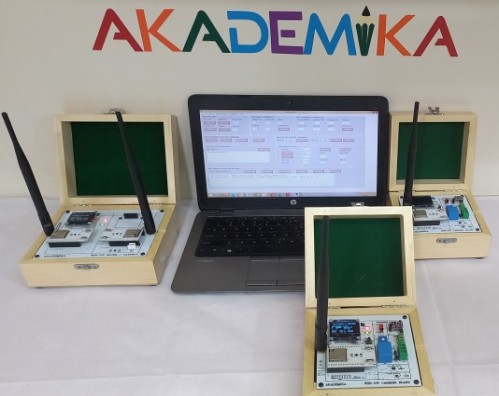
The WL-WSN Trainer is a portable Wireless Sensor Network testbed using ESP32 modules for real-time study of Wi-Fi communication, routing, and sensor-based applications. It supports up to multi-nodes with self-organizing multi-hop networks and requires no frequent reprogramming. A user-friendly GUI enables easy setup, monitoring, and control for practical WSN experiments. The trainer includes support for Wi-Fi-based communication, sensor interfacing, and routing experiments, enabling realistic hands-on WSN learning and application testing.
Evaluate 802.11 (Wi-Fi) Networks
Examine wireless communication, networks, and sensor communication by reconfiguration of Radio and Network Parameters
Measuring Wireless media propagation and parameters affecting the communication reliability
Measuring parameters impacting wireless communication and network formation
Evaluating wireless and sensor network performance parameters
Formulate various defined / programmed Network Configuration
Explore the Network Layer parameters that are not allowed to play with in standard wireless network
Build Applications with available on-board sensors
Explore How IoT Cloud works.
Controlling connect devices from anywhere using your PC/Mobile phones.
Build application to demonstrate home automation.
v 802.11(Wi-Fi ) based ( Master Device and Network Processing Device )
OLED display 1.3”
LED indications: Power, Rx/Tx
Keys :Program, Reset, User key
Serial interface for ProgrammingProcessor:
Xtensa®single-/dual-core 32-bit LX6 microprocessor
Radio
2.4GHz 802.11 compatible
Upto 20.5 dBm of transmitting power, adjustable transmitting power
Receiver sensitivity –90 dBm
TX/RXcurrent 95~100 mA @ 0 dBm
3.3V operationBattery: 3500mAh
Sensors
Integrated Temperature, Pressure and Humidity Sensor
PWM,Relay, DAC, ADC & two programmable DIO“Wireless Ginie”: GUI Application Software
WSN Control Commands to establish Network
Radio/transmission setting: Power, LQI threshold, messagetransmission Retries
Experiment settings: Packet interval, Packet size, Acknowledge type, Experiment Duration,
Changedevice address and Role
Rese tnetwork
Ping
Network device list
Start experiment
Stop experiment
Read and process resultWSN Sensor Control Command
Set PWM
Configure DIO
Set/GetDIO val.
Read sensor and ADC valuesConfigurable Parameters
Radio Parameters
Power: 0 dBm to 19.5 dBm in steps of 11.5 dBm Specific to WiFi (LR) setupo RadioChannel
LQIThreshold, connectivity range: 0-255
Numberof packet transfer retry: 1- 3Experimental Parameters
Packet interval time: 0-999999 mS
Experiment duration: 1-9999 seconds
Datasize in packet: 0-99 Bytes
Packet type: Sequential, Random
ACK for packet: No ACK, Hardware ACK
Startof experiment: Start on reset, Start after commandNetwork Configuration Setting
Facility to emulate and define Network Configuration. The user can set the list ofdevices in the MD and NPD to allow or to block these devices during network formation.
This facility allows the user to create user defined network topology as well createmulti-hop network within the laboratory space.WSN Network Parameters and Processing Display
Facility to display Device list with details like Device, Parent, Hops, DevLQI,
Facility to display Device Parameters like Device, packet Interval, duration, expected Data packets, packet size, Retry, Ack Type, LQI Th.
Facilityto display processed Results like device, data/control transmitted packets,Communication Load %, Dev Efficiency %, Expected NW Efficiency%, NW Efficiency%
Wireless network Setup
Measurement of Distance and Signal Strength (LQI). Find relation between distance and LQI
To study LQI and packet delivery efficiency with No ACK, Hardware ACK and Soft ACK
To study LQI variations through different media (e.g. concrete wall of differentthickness, brick wall etc.)
Measurement of Packet Delivery Ratio.
Measurement of Routing overhead
Measurement of Bandwidth overheads with No ACK, Hardware ACK and Soft ACK.
To study Effect of packet payload on network throughput
To study Effect of packet transmission rate over network throughput
Measurement of Average Transmission Delay.
To study Effect of hops over network transmission delay
Use of Network Nodes as IoT Sensor ( Temperature / Pressure / Humidity )
Use of Network Nodes as Actuator- Driving PWM Based LED , Relay
Use of Network Node for measuring Voltage using ADC.
Calculate communication load, Network efficiency, Device efficiency in different topologylike star, tree, linear Network.
IOT Cloud
Home security Alarm Interface with IoT cloud and IoT carrier
Inventory Control interface with IoT cloud and IoT carrier
Thermostat Control interface with IoT cloud and IoT carrier
Interfacing Sound Sensor with Sensor Base
Interfacing of Air Pressure Sensor with Sensor Base
Interfacing of Temperature Sensor with Sensor Base
Interfacing of Accelerometer Sensor with Sensor Base
With 35 years of legacy in Technical Education, Akademika extends its expertise to Defence and Skill development, building Innovative, Reliable Training Systems for the next generation of Learners.
Partner with Akademika
Join leading institutions that trust our engineering to Advance Learning and Research.